- Page d'accueil /
- Produits de bureau /
- Électronique de bureau /
- Produits de présentation /
- Presentation Remotes /
- QUI Presentation Clicker Wireless Presenter R...
0 ratings


Numéro d'article:
166880056
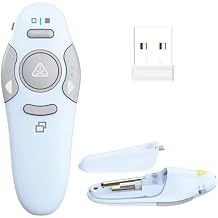
QUI Presentation Clicker Wireless Presenter Remote Clicker for PowerPoint Presentation Remote, PowerPoint Slide Advancer for Mac/Windows/Linux,
Numéro d'article:
166880056
DJF 2510
Price Details
Excluding Shipping & Custom charges ( Shipping and custom charges will be calculated on checkout )
*All items will import from États-Unis
0 ratings
Écrire un commentaire
En stock
 Importé depuis la boutique USA
Commandez maintenant et recevez votre commande aux alentours du Monday, Juillet 13
Transaction sécurisée
Ubuy s'engage à protéger votre sécurité et votre confidentialité. Notre système avancé de sécurité des paiements garantit la confidentialité en chiffrant vos informations lors de la transmission grâce aux protocoles AES (Advanced Encryption Standards) et SSL (Secure Socket Layer). Vos coordonnées de paiement sont 100 % sécurisées car nous ne partageons pas vos informations de paiement avec des vendeurs tiers.
Nos meilleurs partenaires logistiques


This wireless presentation clicker is designed to work flawlessly with laptops, electronic whiteboards, and projectors, making it an essential tool for teachers, lecturers, tutors, and public speakers.

Livraison
rapide

Retour
gratuit*

Emballage sécurisé

Produits 100 % originaux

Conformité PCI DSS

Certifié ISO 27001


Note: Step Down Voltage Transformer required for using electronics products of États-Unis store (110-120). Recommended power converters Acheter maintenant.


Ce qui se démarque
Wide Compatibility
Compatible with Mac, Windows, and Linux systems, this clicker effortlessly manages presentations across various platforms, ensuring seamless performance for all users.
User-Friendly Design
Ergonomically designed for comfort and ease of use, the wireless presenter allows you to advance slides without disruptions, enhancing your presentation experience.
Long Range Control
With impressive wireless range, you can control your presentation from anywhere in the room, providing flexibility and freedom to engage your audience effectively.
Détails du produit
| Item Weight | 0.3 lbs (140 grams) |
À qui est-ce destiné ?

-
Business Presenters
Ideal for professionals needing to advance slides seamlessly during pitches or meetings without interruptions.
-
Educators and Trainers
Perfect for teachers and trainers conducting lectures, allowing for smooth transitions between slides while engaging students.
-
Remote Workers
Great for remote employees presenting via video calls, providing mobility without being tethered to a computer.

-
Casual Users
Not suitable for users who rarely present, as investing in a remote may be unnecessary for occasional use.
-
Technical Newbies
Could be complicated for users unfamiliar with technology, especially regarding setup and connectivity with devices.
-
Limited Budgets
Not ideal for users on a tight budget who need a more basic presentation solution without advanced features.
DESCRIPTION DU PRODUIT
QUI Presentation Clicker Wireless Presenter Remote Clicker for PowerPoint Presentation Remote, PowerPoint Slide Advancer for Mac/Windows/Linux, Google Slide/PPT/Keynote, USB A, Blue
Vous avez une question ? Chattez avec nous
Questions et réponses des clients
-
question:
What devices are compatible with the QUI Presentation Clicker?
répondre: The QUI Presentation Clicker is compatible with a wide range of devices including Windows PCs, Mac computers, and Linux systems. It seamlessly integrates with popular presentation software such as Microsoft PowerPoint, Google Slides, and Keynote. This versatility ensures that presenters can utilize the clicker no matter their operating system or preferred software, making it ideal for diverse environments like classrooms, boardrooms, or event venues. -
question:
How does the QUI Presentation Clicker connect to a device?
répondre: The QUI Presentation Clicker connects wirelessly via a USB receiver. Simply plug the receiver into your computer's USB port, and the clicker automatically pairs, without the need for special software or drivers. This plug-and-play feature means you can set up quickly before your presentation begins, allowing you to focus on delivering your content instead of troubleshooting connectivity issues. -
question:
What features does the QUI Presentation Clicker offer?
répondre: The QUI Presentation Clicker is packed with features designed to enhance your presentation experience. It includes a laser pointer for highlighting important points, button controls for advancing slides backward and forward, and a built-in timer to keep you on track. These features facilitate a smooth presentation flow, ensuring that your audience remains engaged and that you effectively convey your message. -
question:
Is the QUI Presentation Clicker suitable for professional use?
répondre: Absolutely! The QUI Presentation Clicker is designed with professionals in mind. Its sleek design and advanced functionality make it suitable for corporate presentations, educational lectures, and even online webinars. The reliable performance ensures that you can confidently control your slides from anywhere in the room, enhancing your professionalism and ensuring a smooth delivery. -
question:
Can the QUI Presentation Clicker work with Google Slides?
répondre: Yes, the QUI Presentation Clicker is fully compatible with Google Slides. By using it with a laptop or desktop that is connected to the internet, you can navigate through your Google Slides presentation smoothly. This makes it an excellent choice for users who prefer web-based presentations, allowing for a seamless transition between different platforms and software solutions. -
question:
What range does the QUI Presentation Clicker have?
répondre: The QUI Presentation Clicker typically operates within a range of up to 100 feet (30 meters). This extended range allows you to move around the room while engaging with your audience and maintaining control over your presentation. Whether you're presenting in a small classroom or a large auditorium, the clicker's functionality ensures that you can connect with your audience without being tethered to your device. -
question:
How is the battery life of the QUI Presentation Clicker?
répondre: The QUI Presentation Clicker boasts an impressive battery life, designed for longevity during presentations. Depending on usage, one battery can last for several months before needing replacement. This means you can rely on it for daily use without frequent interruptions, allowing you to focus on your presentation instead of worrying about battery life. -
question:
What should I do if the QUI Presentation Clicker does not work?
répondre: If the QUI Presentation Clicker does not work, first ensure that the USB receiver is securely plugged into your device. Check if the batteries are properly installed and charged. Additionally, make sure there are no obstructions between the clicker and the receiver. If issues persist, consider testing the clicker with a different device to determine if the problem lies with the clicker or the initial device. -
question:
Can I customize the buttons on the QUI Presentation Clicker?
répondre: The QUI Presentation Clicker comes with standard settings for slide advancement and other functions, but customization may depend on the software you use. While native functions are generally fixed, you may be able to assign different actions within specific presentation software settings. This feature allows users to tailor their experience to better suit their presentation style and needs. -
question:
Where can I buy the QUI Presentation Clicker in Djibouti?
répondre: You can purchase the QUI Presentation Clicker from Ubuy in Djibouti. Ubuy offers a wide selection of electronic devices including the QUI Presentation Clicker, ensuring you can easily find and order the product you need. With a user-friendly online shopping experience and reliable customer service, Ubuy is a great choice for acquiring your presentation tools.
QUI Presentation Remotes Editorial Review
The QUI Presentation Clicker has garnered a positive reception among users, particularly those in the educational sector. Users have Consistently praised its ease of use and setup, noting that simply plugging in the USB receiver allows for immediate functionality without the hassle of complicated configurations. The clicker's responsiveness and effective range have also been highlighted, with many reporting a lack of lag or issues during use, making it a reliable choice for presentations, training sessions, and meetings. One standout feature that many users have appreciated is the inclusion of a laser pointer, which has added value during presentations. While the functionality of the laser pointer was noted to be inConsistent by some, most found the clicker's general design and operation to be user-friendly. The variety of color options, including a light purple and pink variant, has appealed to users seeking something that stands out from conventional presentation tools. However, there were a few critical points raised about the clicker's durability. Users have experienced issues with the device not responding after repeated use in a classroom setting. One user mentioned that after dropping the clicker, it ceased to function, highlighting potential concerns regarding its sturdiness. In summary, the QUI Presentation Clicker is an excellent tool for individuals who frequently present, thanks to its effective performance and colorful design. However, those in active environments should be mindful of its durability in the face of occasional drops. **
Avis et évaluations clients
1 évaluations des clients
-
5 étoile
100%
-
4 étoile
0%
-
3 étoile
0%
-
2 étoile
0%
-
1 étoile
0%
Donnez votre avis sur ce produit
Partagez votre avis avec d'autres clients
Avantages
- Easy setup and use; plug-and-play functionality
- Responsive buttons with excellent range
- Includes a laser pointer
- Colorful design options available
Les inconvénients
- Durability concerns, especially if dropped
Platform Trust & Buyer Confidence

MT
Mohd
Verified buyer
“The product received very good packaging & safe…Thank You”
16 June 2026 · via Trustpilot
SJ
Shawati
Verified buyer
“Accurate delivery timing given”
16 June 2026 · via Trustpilot
YB
Youcef
Verified buyer
“Not madly expensive like I thought, and much quicker than promised.”
15 June 2026 · via Trustpilot
LM
Leila
Verified buyer
“Never dealt with Ubuy before, but everything worked out great. Seamless cross border purchasing and shipping. Thanks!”
6/7/2026 · via Trustpilot
KA
Kwame
Verified buyer
“The process was smooth, with clear communication and timelines. This was my 1st purchase and I am really impressed. I will definitely be coming back.”
12 June 2026 · via Trustpilot
Paiement sécurisé
Global Delivery
Easy Returns
Genuine Products
Historique des prix du produit
Informations importantes
- Limitations : Pour les produits expédiés à l'international, veuillez noter que toute garantie du fabricant peut ne pas être valide ; les options de service du fabricant peuvent ne pas être disponibles ; les manuels, instructions et avertissements de sécurité des produits peuvent ne pas être dans les langues du pays de destination ; les produits (et les matériaux qui les accompagnent) peuvent ne pas être conçus conformément aux normes, spécifications et exigences d'étiquetage du pays de destination ; et les produits peuvent ne pas être conformes à la tension et aux autres normes électriques du pays de destination (nécessitant l'utilisation d'un adaptateur ou d'un convertisseur le cas échéant). Il incombe au destinataire de s'assurer que le produit peut être importé légalement dans le pays de destination. En cas de commande auprès d'Ubuy ou de ses filiales, le destinataire est l'importateur officiel et doit se conformer à toutes les lois et réglementations du pays de destination.
- Tous les produits listés sur Ubuy ne sont pas à vendre, Ubuy étant un moteur de recherche mondial. Les produits sont soumis aux réglementations en matière d'exportation et de commerce.
DJF 2510
Commandez maintenant et recevez votre commande aux alentours du Monday, Juillet 13
This item is not restrict in my country.(Please click on above link if this item is not restrict in your country, So our team will review and allow.)
QTY:
Transaction sécurisée
PCI DSS compliant and ISO 27001:2022 certified, with encrypted payments and full buyer protection on every order.
Nos meilleurs partenaires logistiques
Livraison transfrontalière la plus rapide
Caractéristiques et avantages
- Built-in red light pointer highlights key presentation points.
- Wireless range of up to 328 feet for dynamic audience interaction.
- Broad compatibility with major operating systems and presentation software.
- Easy to plug and play; no software installation required.
- Power switch extends battery life when not in use.
- Essential tool for teachers, lecturers, and public speakers.
Ubuy Assurance
Experience worry-free shopping with 100% original products, PCI DSS-compliant payment security, ISO 27001-certified data protection, the fastest cross-border delivery, free returns *, and secure packaging on every order.