0 ratings


Numéro d'article:
103417801
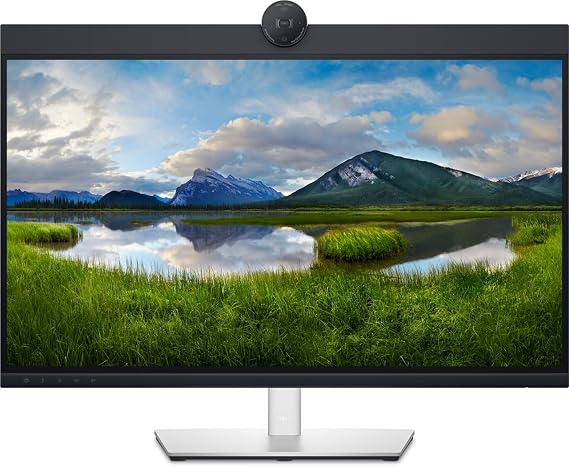
Dell 27 P27 Video Conference Monitor
Numéro d'article:
103417801
DJF 98586
Price Details
Excluding Shipping & Custom charges ( Shipping and custom charges will be calculated on checkout )
*All items will import from États-Unis
0 ratings
Écrire un commentaire
En stock
 Importé depuis la boutique USA
QTY:
Commandez maintenant et recevez votre commande aux alentours du Vendredi, Juillet 03
Transaction sécurisée
Ubuy s'engage à protéger votre sécurité et votre confidentialité. Notre système avancé de sécurité des paiements garantit la confidentialité en chiffrant vos informations lors de la transmission grâce aux protocoles AES (Advanced Encryption Standards) et SSL (Secure Socket Layer). Vos coordonnées de paiement sont 100 % sécurisées car nous ne partageons pas vos informations de paiement avec des vendeurs tiers.
nos meilleurs partenaires logistiques


Livraison
rapide

Retour
gratuit*

Emballage sécurisé

Produits 100 % originaux

Conformité PCI DSS

Certifié ISO 27001


Note: Step Down Voltage Transformer required for using electronics products of États-Unis store (110-120). Recommended power converters Acheter maintenant.


Ce qui se démarque
High-Definition Clarity
The Dell 27 P27 monitor delivers stunning 4K UHD resolution, ensuring crystal-clear visuals for video conferences, enhancing the overall communication experience and clarity for participants.
Integrated Webcam
Equipped with a high-quality integrated webcam, the monitor simplifies video calls without additional hardware, promoting a clutter-free workspace while ensuring professional-level video quality.
Ergonomic Design
Featuring adjustable height and tilt options, the ergonomic design of the Dell 27 P27 ensures comfortable viewing for long meetings, reducing strain and promoting better posture during video calls.
Détails du produit
| Item Weight | 8.4 lbs (3.81 kg) |
À qui est-ce destiné ?

-
Remote Workers
The monitor offers excellent video quality for video conferences, enhancing remote communication and collaboration with colleagues.
-
Content Creators
With high resolution and color accuracy, it's ideal for designers and video editors looking for precise visuals.
-
Businesses
Perfect for office setups, it provides features tailored for video conferencing, improving team connectivity and efficiency.

-
Gaming Enthusiasts
Its slower refresh rate may not satisfy hardcore gamers looking for high-performance monitors for fast-paced gaming.
-
Casual Users
Those who need basic computing tasks may find the features excessive, leading to unnecessary expenses.
-
Budget-Conscious Buyers
The monitor's premium features may not align with tight budgets, as it could be considered costly for basic use.
DESCRIPTION DU PRODUIT
Dell 27 P27 Video Conference Monitor
Vous avez une question ? Chattez avec nous
Questions et réponses des clients
-
question:
What are the primary features of the Dell 27 Video Conferencing Monitor P27?
répondre: The Dell 27 Video Conferencing Monitor P27 boasts a large 27-inch screen, Full HD resolution, and excellent color accuracy. It includes built-in speakers and a webcam, making it ideal for virtual meetings and conference calls. Additionally, it has multiple connectivity options like HDMI, DisplayPort, and USB-C, allowing for seamless integration with various devices. This monitor is designed to enhance productivity and create an immersive viewing experience, perfect for professionals who rely heavily on video conferencing. -
question:
How does the built-in webcam of the Dell P27 perform for video conferencing?
répondre: The built-in webcam in the Dell P27 offers clear, high-definition video quality, which is crucial for professional video calls. This feature eliminates the need for an external camera, simplifying setup and reducing clutter. Additionally, it typically comes with privacy features to ensure your security during calls. Whether you're conducting business meetings or connecting with colleagues remotely, this integrated webcam provides convenience and maintains professionalism during your interactions. -
question:
Can I use the Dell P27 monitor for gaming?
répondre: While the Dell 27 Video Conferencing Monitor P27 is primarily designed for professional use, it can still be used for casual gaming. It supports adequate refresh rates and offers decent response times that can cater to light gaming experiences. However, if you're seeking a high-performance gaming monitor with features such as higher refresh rates and adaptive sync technology, you may want to consider dedicated gaming monitors. For gamers who occasionally play, the P27 will perform satisfactorily. -
question:
What settings are available for adjusting the display on the Dell P27?
répondre: The Dell 27 Video Conferencing Monitor P27 offers a variety of settings to customize your display experience. Users can adjust brightness, contrast, color settings, and screen presets to suit their viewing needs. Furthermore, the monitor includes features like flicker-free technology and a blue light filter, which help to reduce eye strain during long hours of use. These settings cater to different work environments, whether for graphic design, office work, or video conferencing. -
question:
Does the Dell P27 support multiple displays?
répondre: Yes, the Dell P27 is well-suited for multi-monitor setups. The various connectivity options, including HDMI and DisplayPort, allow you to connect additional monitors effortlessly. This feature is particularly beneficial for users who multitask or require more screen real estate for complex projects. By setting up multiple displays, you can enhance productivity, improve workflow efficiency, and have a more immersive computing environment for tasks such as data analysis or video editing. -
question:
What ergonomic features does the Dell P27 offer?
répondre: The Dell 27 Video Conferencing Monitor P27 comes with several ergonomic features designed to enhance comfort during prolonged use. It includes height adjustment, tilt, swivel, and pivot functions, allowing users to find the most comfortable viewing angle. These adjustments are essential for maintaining good posture and reducing back and neck strain during extended working hours. Whether you're working from home or in an office, these ergonomic features ensure you can work comfortably and efficiently. -
question:
Is the Dell P27 compatible with Mac computers?
répondre: Yes, the Dell 27 Video Conferencing Monitor P27 is compatible with Mac computers. It supports common connectivity options such as USB-C, HDMI, and DisplayPort, making it versatile for different operating systems. Users will benefit from its high-resolution display for both work and entertainment purposes. This compatibility makes the P27 a great choice for users who switch between devices or those who work in mixed-OS environments, ensuring a smooth transition regardless of the system used. -
question:
What is the color accuracy of the Dell P27 monitor?
répondre: The Dell 27 Video Conferencing Monitor P27 is praised for its impressive color accuracy, often covering 99% of the sRGB color gamut. This feature is particularly beneficial for professionals in fields like graphic design and photography, where precise color representation is crucial. With factory-calibrated settings, users can expect vibrant colors and consistent performance, making it a reliable choice for visually demanding tasks while facilitating effective communication in video conferencing settings. -
question:
What are the installation requirements for the Dell P27 monitor?
répondre: Installing the Dell 27 Video Conferencing Monitor P27 is straightforward. It can be mounted on a desk using a stand, which is included in the box, or attached to a VESA-compatible mount for enhanced flexibility. The required cables (HDMI, DisplayPort) are generally included, ensuring you have everything needed for quick setup. Depending on your workspace, you can adjust the height and angle for optimal viewing, making it easy to integrate into any office setup, whether at home or in a workplace. -
question:
Where can I buy the Dell 27 Video Conferencing Monitor P27 in Djibouti?
répondre: You can buy the Dell 27 Video Conferencing Monitor P27 from Ubuy in Djibouti. Ubuy offers a wide selection of Dell products, along with user-friendly options for viewing specifications and additional details, ensuring you find the right setup for your needs.
Dell Monitors Editorial Review
Aucune critique éditoriale trouvée
Avis et évaluations clients
1 évaluations des clients
-
5 étoile
100%
-
4 étoile
0%
-
3 étoile
0%
-
2 étoile
0%
-
1 étoile
0%
Donnez votre avis sur ce produit
Partagez votre avis avec d'autres clients
Avantages
- Excellent display quality
- Clear video and audio
- User-friendly interface
- Versatile connectivity options
- Sleek and stylish design
Les inconvénients
- Stand height adjustment could be better.
Historique des prix du produit
Informations importantes
- Limitations : Pour les produits expédiés à l'international, veuillez noter que toute garantie du fabricant peut ne pas être valide ; les options de service du fabricant peuvent ne pas être disponibles ; les manuels, instructions et avertissements de sécurité des produits peuvent ne pas être dans les langues du pays de destination ; les produits (et les matériaux qui les accompagnent) peuvent ne pas être conçus conformément aux normes, spécifications et exigences d'étiquetage du pays de destination ; et les produits peuvent ne pas être conformes à la tension et aux autres normes électriques du pays de destination (nécessitant l'utilisation d'un adaptateur ou d'un convertisseur le cas échéant). Il incombe au destinataire de s'assurer que le produit peut être importé légalement dans le pays de destination. En cas de commande auprès d'Ubuy ou de ses filiales, le destinataire est l'importateur officiel et doit se conformer à toutes les lois et réglementations du pays de destination.
- Tous les produits listés sur Ubuy ne sont pas à vendre, Ubuy étant un moteur de recherche mondial. Les produits sont soumis aux réglementations en matière d'exportation et de commerce.
DJF 98586
Commandez maintenant et recevez votre commande aux alentours du Vendredi, Juillet 03
This item is not restrict in my country.(Please click on above link if this item is not restrict in your country, So our team will review and allow.)
QTY:
Transaction sécurisée
Ubuy s'engage à protéger votre sécurité et votre confidentialité. Notre système avancé de sécurité des paiements garantit la confidentialité en chiffrant vos informations lors de la transmission grâce aux protocoles AES (Advanced Encryption Standards) et SSL (Secure Socket Layer). Vos coordonnées de paiement sont 100 % sécurisées car nous ne partageons pas vos informations de paiement avec des vendeurs tiers.
nos meilleurs partenaires logistiques
Livraison transfrontalière la plus rapide