0 ratings

Numéro d'article:
94396475
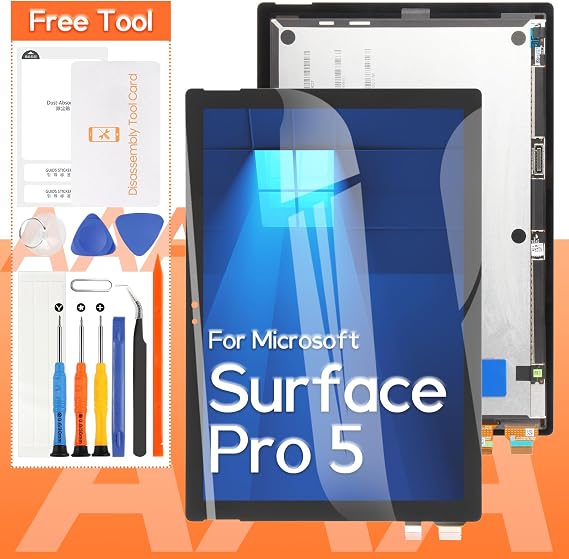
Screen Replacement for Microsoft Surface Pro 5 1796 LP123WQ1 LCD Display Touch Screen Digitizer Full Assembly(Black)
Numéro d'article:
94396475
DJF 22959
Price Details
Excluding Shipping & Custom charges ( Shipping and custom charges will be calculated on checkout )
*All items will import from États-Unis
0 ratings
Écrire un commentaire
En stock
 Importé depuis la boutique USA
QTY:
Commandez maintenant et recevez votre commande aux alentours du Samedi, Août 29
Transaction sécurisée
Ubuy s'engage à protéger votre sécurité et votre confidentialité. Notre système avancé de sécurité des paiements garantit la confidentialité en chiffrant vos informations lors de la transmission grâce aux protocoles AES (Advanced Encryption Standards) et SSL (Secure Socket Layer). Vos coordonnées de paiement sont 100 % sécurisées car nous ne partageons pas vos informations de paiement avec des vendeurs tiers.
Nos meilleurs partenaires logistiques


We offer a complete replacement kit for the Microsoft Surface Pro 5, ensuring a straightforward installation while providing essential tools for a hassle-free experience.

Livraison
rapide

Retour
gratuit*

Emballage sécurisé

Produits 100 % originaux

Conformité PCI DSS

Certifié ISO 27001


Note: Step Down Voltage Transformer required for using electronics products of États-Unis store (110-120). Recommended power converters Acheter maintenant.


Ce qui se démarque
Easy Installation
Designed for straightforward installation, this screen replacement kit allows users to swiftly replace their damaged display without professional help, saving both time and repair costs.
High-Quality Display
Featuring an LP123WQ1 LCD, this display ensures vibrant colors and sharp visuals, greatly enhancing the user experience for professionals and casual users alike.
Complete Assembly
The full assembly includes everything needed for a seamless replacement, eliminating the hassle of searching for additional parts, making it convenient for users wanting a comprehensive solution.
Détails du produit
| Package Dimensions | 13.27 x 10.91 x 1.85 inches (33.7 x 27.7 x 4.7 cm) |
| Item Weight | 1.26 pounds (570 grams) |
| Manufacturer | THIRDPOLE |
| Item model number | 1796,LP123WQ1 |
| Date First Available | August 1, 2024 |
À qui est-ce destiné ?

-
Repair Enthusiasts
Ideal for DIYers looking to fix their broken Surface Pro 5 screen at an affordable price.
-
Device Owners
Perfect for users whose devices have cracked screens and need a reliable replacement solution.
-
Technical Professionals
Suitable for technicians who specialize in electronic repairs and require quality replacement components.

-
Non-Tech Users
Not suitable for individuals who lack technical skills for installation or repair of electronic devices.
DESCRIPTION DU PRODUIT
Screen Replacement for Microsoft Surface Pro 5 1796 LP123WQ1 LCD Display Touch Screen Digitizer Full Assembly(Black)
Vous avez une question ? Chattez avec nous
Questions et réponses des clients
-
question:
What should I consider before replacing my Microsoft Surface Pro 5 screen?
répondre: Before proceeding with a screen replacement for your Microsoft Surface Pro 5, consider your technical skills and tools required. Replacement might involve delicate procedures such as disassembling the device and managing fragile components. It’s crucial to have a clean workspace and the correct tools, including a heat gun, suction cup, and prying tools. If you have experience with DIY electronics repair, you may successfully undertake this task, but if not, professional assistance may be preferable. -
question:
Can I install the Screen Replacement myself?
répondre: Yes, you can install the screen replacement for your Surface Pro 5 yourself, provided you're comfortable with DIY repairs. Tutorials and guides online provide step-by-step instructions. However, ensure that you have the right tools and a careful approach, as damaging components during installation is a risk. This replacement can extend the device's lifespan and restore its functionality, making your Surface Pro usable for everyday tasks once again. -
question:
How can I ensure the new LCD display is compatible with my Surface Pro 5?
répondre: To ensure compatibility, verify that the screen replacement is specifically designed for the Microsoft Surface Pro 5, model number 1796. Check product descriptions and specifications from suppliers to confirm that they match your device. This screen replacement features an LP123WQ1 LCD display and touch screen digitizer assembly, making it suitable for precise fit and performance. Double-checking the details helps prevent issues that could arise from mismatched components, ensuring smooth operation. -
question:
What tools do I need for replacing my Surface Pro 5 screen?
répondre: For a successful screen replacement, you will need a few essential tools: a precision screwdriver set, a heat gun or hairdryer (to soften the adhesive), a suction cup, and plastic prying tools. These tools enable you to carefully open your device without causing damage. If you are equipped with these tools and follow a detailed guide, you can complete the replacement process effectively and safely, restoring your tablet’s functionality. -
question:
What features should I look for in a replacement screen?
répondre: When choosing a replacement screen for your Microsoft Surface Pro 5, consider features such as display resolution, color accuracy, and touch response. A high-quality full assembly replacement typically offers 2736 x 1824 resolution and an IPS panel for vibrant colors. Make sure the screen is a complete assembly, meaning it includes the LCD display, digitizer, and necessary encapsulations for ease of installation. These factors enhance your viewing experience and ensure the device performs as intended. -
question:
Is there a way to test the new screen before fully reinstalling it?
répondre: Yes, before fully reinstalling the new screen into your Surface Pro 5, it is advisable to connect it temporarily to the motherboard to perform basic functionality tests. This way, you can check for display quality, touch responsiveness, and overall function. Ensure all connections are secure yet easy to remove so you can address any issues promptly. Testing beforehand can save time and frustration, ensuring your device operates correctly once the installation is complete. -
question:
What common issues can arise during the installation of a new screen?
répondre: Common issues during installation include improper adhesive removal, damaged connectors, or misalignment of the screen. These problems can lead to display malfunction or the screen not adhering correctly. To reduce risks, ensure you follow a detailed guide, handle components carefully, and double-check alignments before sealing the device. If encountered, troubleshooting these common pitfalls early in the process can lead to a smoother installation experience, ensuring your Surface Pro 5 operates as intended. -
question:
How do I properly dispose of my old screen?
répondre: Proper disposal of your old Surface Pro 5 screen is important for environmental protection. Check local electronic waste regulations to find out how to recycle electronic components responsibly. Many communities have designated drop-off locations for e-waste. Disposing of it in an environmentally friendly manner helps minimize waste and ensures that harmful materials in electronic devices are managed correctly. -
question:
Where can I buy Screen Replacement for Microsoft Surface Pro 5 1796 LP123WQ1 LCD Display Touch Screen Digitizer Full Assembly(Black) in Djibouti?
répondre: You can buy the Screen Replacement for Microsoft Surface Pro 5 1796 LP123WQ1 LCD Display Touch Screen Digitizer Full Assembly (Black) at Ubuy. They offer a reliable platform with a wide selection of replacement parts, ensuring you receive a quality product that meets your device’s specifications. Check their website for availability and detailed product information to assist you in making the right purchase.
THIRDPOLE Replacement Screens 1796,LP123WQ1 Editorial Review
Aucune critique éditoriale trouvée
Avis et évaluations clients
1 évaluations des clients
-
5 étoile
100%
-
4 étoile
0%
-
3 étoile
0%
-
2 étoile
0%
-
1 étoile
0%
Donnez votre avis sur ce produit
Partagez votre avis avec d'autres clients
Avantages
- High-quality display
- Easy to install
- Touch functionality works well
- Durable and reliable
- Good color accuracy
Les inconvénients
- May require minor adjustments after installation.
Platform Trust & Buyer Confidence

MA
Mohammad
Verified buyer
“Excellent quality and original too,when ubuy send original things I will appreciate that ,I very satisfied thank you”
23 July 2026 · via Trustpilot
CK
Chitra
Verified buyer
“The order and delivery progress was communicated very well. Package arrived within the estimated time. Products arrived as expected in good condition.”
22-Jul-26 · via Trustpilot
K
kund
Verified buyer
“Good supply of products. Safe payment methods, and shipment worldwide! Genuine products.”
23-Jul-26 · via Trustpilot
OO
Onesi
Verified buyer
“Was my first time buying a product from Ubuy, but I found it so helpful. This is reliable. Gonna place a new order!”
22 July 2026 · via Trustpilot
SJ
SAO JOHN
Verified buyer
“Ubuy is a great online platform to buy stuff. Reliable, fast delivery time and great value for money. I've been using Ubuy online shopping platform for three years now and will continue to do so.”
23 July 2026 · via Trustpilot
Paiement sécurisé
Global Delivery
Easy Returns
Genuine Products
Historique des prix du produit
Informations importantes
- Limitations : Pour les produits expédiés à l'international, veuillez noter que toute garantie du fabricant peut ne pas être valide ; les options de service du fabricant peuvent ne pas être disponibles ; les manuels, instructions et avertissements de sécurité des produits peuvent ne pas être dans les langues du pays de destination ; les produits (et les matériaux qui les accompagnent) peuvent ne pas être conçus conformément aux normes, spécifications et exigences d'étiquetage du pays de destination ; et les produits peuvent ne pas être conformes à la tension et aux autres normes électriques du pays de destination (nécessitant l'utilisation d'un adaptateur ou d'un convertisseur le cas échéant). Il incombe au destinataire de s'assurer que le produit peut être importé légalement dans le pays de destination. En cas de commande auprès d'Ubuy ou de ses filiales, le destinataire est l'importateur officiel et doit se conformer à toutes les lois et réglementations du pays de destination.
- Tous les produits listés sur Ubuy ne sont pas à vendre, Ubuy étant un moteur de recherche mondial. Les produits sont soumis aux réglementations en matière d'exportation et de commerce.
DJF 22959
Commandez maintenant et recevez votre commande aux alentours du Samedi, Août 29
This item is not restrict in my country.(Please click on above link if this item is not restrict in your country, So our team will review and allow.)
QTY:
Transaction sécurisée
PCI DSS compliant and ISO 27001:2022 certified, with encrypted payments and full buyer protection on every order.
Nos meilleurs partenaires logistiques
Livraison transfrontalière la plus rapide
Caractéristiques et avantages
- Complete replacement kit for Microsoft Surface Pro 5.
- Includes essential tools for easy installation.
- No paper instructions—video guides available on YouTube.
- Professional installation experience recommended.
- Thorough quality testing before shipment.
- Satisfactory solutions for any faulty products.
Ubuy Assurance
Experience worry-free shopping with 100% original products, PCI DSS-compliant payment security, ISO 27001-certified data protection, the fastest cross-border delivery, free returns *, and secure packaging on every order.