- Page d'accueil /
- High-tech /
- Accessoires informatiques /
- Computer Accessories & Peripherals /
- Input Devices /
- Digital Pens /
- Surface Slim Pen 2 for Microsoft Surface Slim...
0 ratings


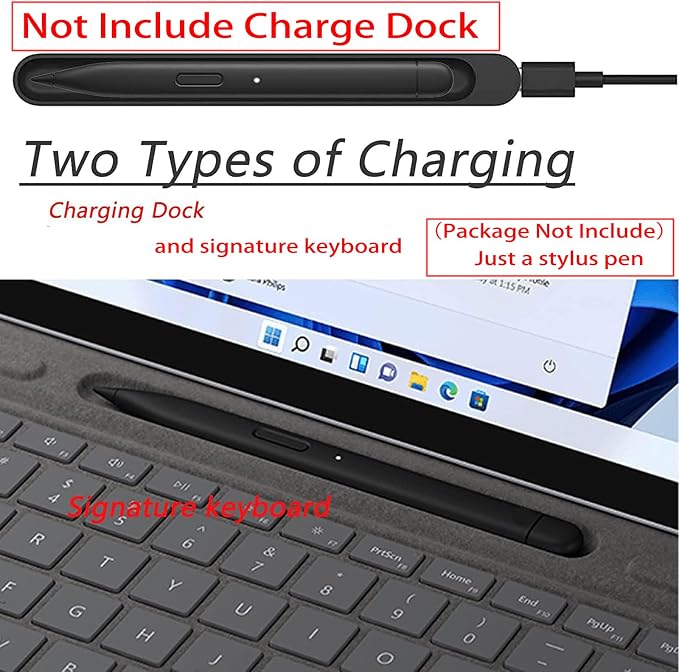




Numéro d'article:
74377023
Surface Slim Pen 2 for Microsoft Surface Slim Pen 2,Bluetooth 5.0 Connectivity with 4,096 Pressure Levels for Smooth Writing and Drawing,Charging
81% des répondants recommanderaient ceci à un ami
Numéro d'article:
74377023
DJF 18894
Détails du prix
Hors frais de livraison et de douane ( Les frais de livraison et de douane seront calculés lors du paiement )
*Tous les articles seront importés depuis États-Unis
En stock
 Importé depuis la boutique USA
QTY:
Commandez maintenant et recevez votre commande aux alentours du Jeudi, Septembre 24
Transaction sécurisée
Ubuy s'engage à protéger votre sécurité et votre confidentialité. Notre système avancé de sécurité des paiements garantit la confidentialité en chiffrant vos informations lors de la transmission grâce aux protocoles AES (Advanced Encryption Standards) et SSL (Secure Socket Layer). Vos coordonnées de paiement sont 100 % sécurisées car nous ne partageons pas vos informations de paiement avec des vendeurs tiers.
Nos meilleurs partenaires logistiques


Livraison
rapide

Retour
gratuit*

Emballage sécurisé

Produits 100 % originaux

Conformité PCI DSS

Certifié ISO 27001



Note: Step Down Voltage Transformer required for using electronics products of États-Unis store (110-120). Recommended power converters Acheter maintenant.


Détails du produit
| Brand | Dogxiong |
| Model Number | Surface_SlimPen_2Dai_Hei |
| Number of Packs | 1 |
| Unit Count | 1 Count |
| Manufacturer | Dogxiong |
| Mfr Part Number | Surface_SlimPen_2Dai_Hei |
| Number of Batteries | 1 AAAA batteries required. |
| Compatible Devices | Surface Pro 8, Surface Pro 9, Surface Pro X, Surface Pro 11, Surface Laptop Studio, Surface Laptop Studio 2, Surface Duo 2, Surface Hub 2S |
| Pressure Sensitivity | 4096 levels |
| Minimum Required Operating System Version | Windows 10 |
| Compatible Tablet Computer Models | Microsoft Surface Go, Microsoft Surface Pro 3, Microsoft Surface Pro 8, Microsoft Surface Pro 9 |
| Item Weight | 0.01 kg |
| Color | Black |
| Enclosure Material | Aluminum |
| Material | Aluminum |
| Compatible Devices | Surface Pro 8, Surface Pro 9, Surface Pro X, Surface Pro 11, Surface Laptop Studio, Surface Laptop Studio 2, Surface Duo 2, Surface Hub 2S See more |
DESCRIPTION DU PRODUIT
Vous avez une question ? Chattez avec nous
Questions et réponses des clients
-
question: Comment acheter Surface Slim Pen 2 for Microsoft Surface Slim Pen en ligne sur Ubuy ?
répondre: Il est facile d'acheter Surface Slim Pen 2 for Microsoft Surface Slim Pen en ligne sur Ubuy.. Il vous suffit de rechercher le produit, de choisir votre mode d'expédition lors du paiement et de le faire livrer à votre emplacement. -
question: Surface Slim Pen 2 for Microsoft Surface Slim Pen est-il disponible pour effectuer des achats en ligne à Djibouti ?
répondre: Oui, chez Ubuy Djibouti, ce produit est disponible pour vous à un prix raisonnable.. Le Surface Slim Pen 2 for Microsoft Surface Slim Pen n'est pas disponible localement mais vous pouvez nous faire confiance avec nos services d'expédition express. -
question: Combien de temps faut-il pour obtenir le produit après avoir passé la commande ?
répondre: Le délai de livraison de votre produit commandé varie en fonction de ce que vous avez commandé et de la méthode d'expédition que vous avez choisie.. Le délai de livraison estimé est mentionné lors du processus de commande, alors soyez insouciant lors de vos achats.
Dogxiong Digital Pens Surface_SlimPen_2Dai_Hei Editorial Review


Aucune critique éditoriale trouvée
Avis et évaluations clients
69 évaluations des clients
-
5 étoile
66%
-
4 étoile
4%
-
3 étoile
4%
-
2 étoile
1%
-
1 étoile
25%
Donnez votre avis sur ce produit
Partagez votre avis avec d'autres clients
CONFIANCE EN LA PLATEFORME & PROTECTION DE L'ACHETEUR

JK
Jasmin
Acheteur vérifié
“Great products and very good service: very easy and very fast international delivery.”
9 September 2026 · via Trustpilot
AG
Anke
Acheteur vérifié
“Wonderful online shopping experience, smooth transaction from the start. Payment method works conveniently and delivery is unexpectedly fast and reliable. You go the extra mile for service. What makes this even more amazing, you deliver to Namibia. I will remain a happy Ubuy customer and will increase my purchases for sure! Thank you!”
10 September 2026 · via Trustpilot
H
Hazel
Acheteur vérifié
“Very easy to find the products what you need, and so fast delivery, that’s why I highly recommended to others costumers to used ubuy.”
10 September 2026 · via Trustpilot
O
Opaleye
Acheteur vérifié
“I received exactly what I ordered I was skeptical about your site because that was my first time to order. But the order came timely and neatly packaged. I was not disappointed. Thank you.”
11 September 2026 · via Trustpilot
AC
Adele
Acheteur vérifié
“Easy to find and order what you want on the website. Delivery is quick to the UK”
8 September 2026 · via Trustpilot
Paiement sécurisé
Global Delivery
Retours faciles
Genuine Products
Historique des prix du produit
Informations importantes
- Limitations : Pour les produits expédiés à l'international, veuillez noter que toute garantie du fabricant peut ne pas être valide ; les options de service du fabricant peuvent ne pas être disponibles ; les manuels, instructions et avertissements de sécurité des produits peuvent ne pas être dans les langues du pays de destination ; les produits (et les matériaux qui les accompagnent) peuvent ne pas être conçus conformément aux normes, spécifications et exigences d'étiquetage du pays de destination ; et les produits peuvent ne pas être conformes à la tension et aux autres normes électriques du pays de destination (nécessitant l'utilisation d'un adaptateur ou d'un convertisseur le cas échéant). Il incombe au destinataire de s'assurer que le produit peut être importé légalement dans le pays de destination. En cas de commande auprès d'Ubuy ou de ses filiales, le destinataire est l'importateur officiel et doit se conformer à toutes les lois et réglementations du pays de destination.
- Tous les produits listés sur Ubuy ne sont pas à vendre, Ubuy étant un moteur de recherche mondial. Les produits sont soumis aux réglementations en matière d'exportation et de commerce.
DJF 18894
Commandez maintenant et recevez votre commande aux alentours du Jeudi, Septembre 24
This item is not restrict in my country.(Please click on above link if this item is not restrict in your country, So our team will review and allow.)
QTY:
Transaction sécurisée
Conforme PCI DSS et certifié ISO 27001:2022, avec des paiements chiffrés et une protection complète de l'acheteur pour chaque commande.
Nos meilleurs partenaires logistiques
Livraison transfrontalière la plus rapide
Assurance Ubuy
Profitez d'une expérience d'achat sereine avec des produits 100 % originaux, une sécurité de paiement conforme PCI DSS, une protection des données certifiée ISO 27001, la livraison transfrontalière la plus rapide, les retours gratuits* et un emballage sécurisé pour chaque commande.