- Page d'accueil /
- Électronique /
- Computer Accessories /
- Computer Accessories & Peripherals /
- Computer Memory Card Accessories /
- Memory Card Adapters /
- Sintech NGFF M.2 nVME SSD Adapter Card for Up...
0 ratings






Numéro d'article:
3031278
Sintech NGFF M.2 nVME SSD Adapter Card for Upgrade 2013-2015 Year Macs(Not Fit Early 2013 MacBook Pro)
Numéro d'article:
3031278
DJF 3129
Price Details
Excluding Shipping & Custom charges ( Shipping and custom charges will be calculated on checkout )
*All items will import from États-Unis
En stock
 Importé depuis la boutique USA
QTY:
Commandez maintenant et recevez votre commande aux alentours du Samedi, Août 01
Transaction sécurisée
Ubuy s'engage à protéger votre sécurité et votre confidentialité. Notre système avancé de sécurité des paiements garantit la confidentialité en chiffrant vos informations lors de la transmission grâce aux protocoles AES (Advanced Encryption Standards) et SSL (Secure Socket Layer). Vos coordonnées de paiement sont 100 % sécurisées car nous ne partageons pas vos informations de paiement avec des vendeurs tiers.
Nos meilleurs partenaires logistiques


Livraison
rapide

Retour
gratuit*

Emballage sécurisé

Produits 100 % originaux

Conformité PCI DSS

Certifié ISO 27001


Note: Step Down Voltage Transformer required for using electronics products of États-Unis store (110-120). Recommended power converters Acheter maintenant.


Ce qui se démarque
Enhanced Compatibility
Designed specifically for 2013-2015 Mac models, this adapter card ensures seamless connectivity with NVMe SSDs, unlocking faster performance while preserving the Mac's integrity.
Speed Upgrade
Transform your Mac's performance with NVMe speeds, significantly speeding up boot times and application load times, making it perfect for users needing higher efficiency and speeds.
Easy Installation
Featuring a user-friendly design, this adapter allows for straightforward installation without professional help, enabling users to upgrade their storage easily and efficiently.
Détails du produit
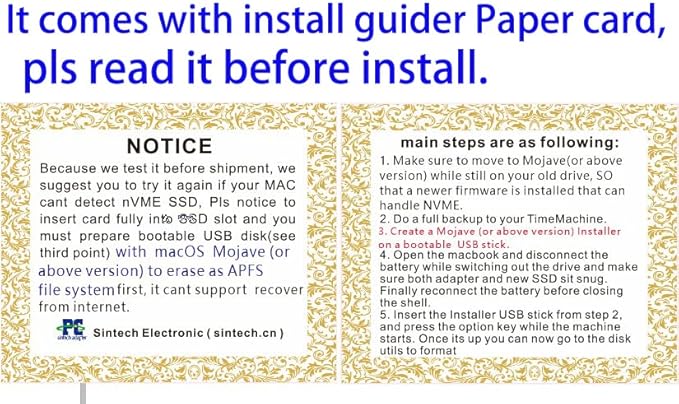
- Notice: The card comes with blak film covering pins ,Sintech install guide paper-card,longer T5 screw and PE PAD,if you didn't get these accessories ,pls report it to us.
- Support Adata NVMe SSD : SX6000, SX7000, SX8200, SX8200 Pro etc,Corsair : MP500, MP510,Crucial : P1,HP: ex920, ex950
- Support Intel NVMe SSD : 600p, 660p, 760p,Toshiba XG3-XG4-XG5-XG5p-XG6 line,Samsung: 960 Evo, 960 Pro, 970 Evo, 970 Pro,WD:v1, v2 and v3,MyDigital: SBX - BPX
- NOT Support: Samsung 970 Evo Plus,PM981,950 Pro
- Notice:It can't support recovering from internet,important to prepare bootable USB disk driver(M.2 PCIe has no OS systerm inside,it must be erased first).There is hibernation for all 2013-2014 Macs,you can set it to resolve this problem by typing "sudo pmset standby 1" as guider in attached photo.if you don't know how to do this, you can ask for help.
| Compatible Devices | Laptop |
| Specific Uses For Product | Laptop |
| Connector Type | M.2 NVME |
| Number of Ports | 1 |
| Power Plug Type | No Plug |
| Smart Home Compatibility | Not Smart Home Compatible |
| Color | Black |
| Finish | Nvme |
| Package Quantity | 1 |
| Unit Count | 1.0 Count |
| Number of Items | 1 |
| Brand | Sintech |
| Model Number | ST-NGFF2013 |
| UPC | 701017254409 701017254492 |
| Manufacturer | Sintech Electronic |
| Mfr Part Number | ST-NGFF2013 |
| Package Weight | 1 Pound |
À qui est-ce destiné ?

-
Mac Users Upgrading
Ideal for users looking to upgrade their 2013-2015 Macs with faster NVMe storage options.
-
Performance Seekers
Perfect for those seeking improved performance in tasks like video editing, gaming, and software development.
-
Cost-Conscious Technicians
Affordable solution for technicians needing a reliable adapter to boost client Mac performance without expensive upgrades.

-
Early 2013 Users
Not suitable for owners of Early 2013 MacBook Pro models due to compatibility issues.
DESCRIPTION DU PRODUIT
About This Item
Upgrade your 2013-2015 Year Mac with the Sintech NGFF M.2 nVME SSD Adapter Card. Please note that this adapter is not compatible with the Early 2013 MacBook Pro. Experience lightning-fast speeds and increased storage capacity with this nVME SSD Adapter Card. Designed to fit snugly into your Mac's SSD slot, this adapter allows you to upgrade your Mac's storage without compromising on performance. To ensure a successful installation, please follow these steps: 1.
Update your Mac to High Sierra while still using your old drive. This will ensure that the newer firmware needed for NVME compatibility is installed. 2. Back up your files with TimeMachine to ensure a smooth transition. 3.
Create a bootable USB stick with the High Sierra Installer. This will be used to format the M.2 SSD. 4. Carefully open your MacBook and disconnect the battery.
Install the adapter and new SSD, making sure they are securely in place. Reconnect the battery before closing the shell. 5. Insert the Installer USB stick and hold down the option key while starting your Mac.
Once it's up, use the disk utilities to format the Sintech NGFF M.2 nVME SSD Adapter Card. Please note that in case your Mac fails to detect the nVME SSD, we recommend trying the installation process again. Ensure that the adapter is inserted fully into the SSD slot, and make sure to have a bootable USB disk prepared with High Sierra to format the M.2 SSD. Upgrade your Mac for improved performance and increased storage capacity with the Sintech NGFF M.2 nVME SSD Adapter Card. Don't miss out on this opportunity to optimize your Mac experience.
Vous avez une question ? Chattez avec nous
Questions et réponses des clients
-
question:
What is the Sintech NGFF M.2 NVMe SSD Adapter Card?
répondre: The Sintech NGFF M.2 NVMe SSD Adapter Card is a specialized expansion card designed to allow users to upgrade their 2013-2015 Mac laptops with an M.2 NVMe SSD. This card enables users to take advantage of faster SSD technology, significantly improving their device's storage performance. Whether you're a creative professional dealing with large files or a casual user needing faster boot and load times, this adapter can enhance your Mac's capabilities. However, it's important to note that it does not fit the Early 2013 MacBook Pro model. -
question:
Will this adapter work with my 2013 MacBook Pro?
répondre: This adapter is compatible with 2013-2015 MacBook Pro models, except for the Early 2013 version. If you own a Mid 2013, Late 2013, or later MacBook Pro, you can benefit from a faster M.2 NVMe SSD by using this adapter. The installation process is straightforward for someone comfortable with computer hardware. Enhanced read/write speeds can lead to quicker file transfer times, boosted application performance, and an overall smoother computing experience. -
question:
How do I install the Sintech NGFF M.2 NVMe SSD Adapter Card?
répondre: Installing the Sintech NGFF M.2 NVMe SSD Adapter Card is a simple process that most users can handle with basic tools. First, you'll need to remove the back cover of your Mac laptop. Then, locate the existing SSD, unscrew it, and replace it with the adapter card and your new NVMe SSD. Reassemble your Mac, and upon booting, format the new drive using Disk Utility. This upgrade can substantially improve your system speed, especially for demanding applications. -
question:
What SSDs are compatible with this adapter card?
répondre: The Sintech NGFF M.2 NVMe SSD Adapter Card is compatible with most M.2 NVMe SSDs in the 2230, 2242, 2260, and 2280 sizes. Brands like Samsung, Western Digital, and Crucial offer various options that can provide high performance when paired with this adapter. Choosing a reputable NVMe SSD can ensure optimal speeds and reliability. An enhanced SSD will dramatically reduce boot times and loading times for applications, enhancing your user experience significantly. -
question:
Can I use this adapter for dual SSD setups?
répondre: No, the Sintech NGFF M.2 NVMe SSD Adapter Card is designed to replace the existing SSD in 2013-2015 MacBook models. This means you cannot use it in conjunction with the original SSD as a dual setup. Instead, it provides an upgrade path to boost your existing storage performance. If you require more storage, consider opting for a higher capacity NVMe SSD for this adapter, enabling you to store more data and improve system performance seamlessly. -
question:
What are the benefits of upgrading to an NVMe SSD?
répondre: Upgrading to an NVMe SSD using the Sintech adapter greatly enhances your computer's performance compared to traditional SATA-based SSDs. Users can experience improved boot time, faster application loading, and better overall responsiveness. This is particularly beneficial for tasks that require large file transfers, such as video editing and gaming. The difference in performance can be quite substantial, making everyday tasks feel much smoother and more efficient. -
question:
Do I need any special software after installing the adapter?
répondre: After installing the Sintech NGFF M.2 NVMe SSD Adapter Card, you will likely need to format your new NVMe SSD using Disk Utility in macOS. This is important to ensure your Mac can recognize and use the new drive. In some cases, you may also want to clone your existing drive using third-party software to transfer data. Following these steps helps ensure a seamless transition to your new faster storage solution. -
question:
Is this adapter card durable and reliable?
répondre: Yes, the Sintech NGFF M.2 NVMe SSD Adapter Card is built with high-quality materials to ensure durability and reliability during usage. It is designed to withstand the rigors of frequent use in laptops and provides a stable connection for your NVMe SSD. Users have reported successful long-term use of this adapter, benefiting from its robust performance while enjoying significant speed improvements in their MacBooks. -
question:
How can I ensure compatibility before purchasing?
répondre: To ensure compatibility, you should check the specific model of your MacBook. The Sintech NGFF M.2 NVMe SSD Adapter Card is designed for 2013-2015 Mac models, excluding Early 2013 MacBook Pro. Additionally, verify the specifications of your current SSD and consider the size of the NVMe SSDs you plan to install. By confirming these details, you can guarantee a seamless upgrade experience that meets your storage needs. -
question:
Where can I buy the Sintech NGFF M.2 NVMe SSD Adapter Card?
répondre: You can purchase the Sintech NGFF M.2 NVMe SSD Adapter Card through Ubuy in Djibouti. Ubuy is a reliable e-commerce platform that offers a wide variety of tech products and accessories. With a user-friendly interface and secure online shopping experience, Ubuy makes it easy to find the adapter you need for your Mac upgrade.
Sintech Memory Card Adapters ST-NGFF2013 Editorial Review


Aucune critique éditoriale trouvée
Avis et évaluations clients
1685 évaluations des clients
-
5 étoile
83%
-
4 étoile
9%
-
3 étoile
3%
-
2 étoile
1%
-
1 étoile
4%
Donnez votre avis sur ce produit
Partagez votre avis avec d'autres clients
Platform Trust & Buyer Confidence

MT
Mohd
Verified buyer
“The product received very good packaging & safe…Thank You”
16 June 2026 · via Trustpilot
SJ
Shawati
Verified buyer
“Accurate delivery timing given”
16 June 2026 · via Trustpilot
YB
Youcef
Verified buyer
“Not madly expensive like I thought, and much quicker than promised.”
15 June 2026 · via Trustpilot
LM
Leila
Verified buyer
“Never dealt with Ubuy before, but everything worked out great. Seamless cross border purchasing and shipping. Thanks!”
6/7/2026 · via Trustpilot
KA
Kwame
Verified buyer
“The process was smooth, with clear communication and timelines. This was my 1st purchase and I am really impressed. I will definitely be coming back.”
12 June 2026 · via Trustpilot
Paiement sécurisé
Global Delivery
Easy Returns
Genuine Products
Historique des prix du produit
Informations importantes
- Limitations : Pour les produits expédiés à l'international, veuillez noter que toute garantie du fabricant peut ne pas être valide ; les options de service du fabricant peuvent ne pas être disponibles ; les manuels, instructions et avertissements de sécurité des produits peuvent ne pas être dans les langues du pays de destination ; les produits (et les matériaux qui les accompagnent) peuvent ne pas être conçus conformément aux normes, spécifications et exigences d'étiquetage du pays de destination ; et les produits peuvent ne pas être conformes à la tension et aux autres normes électriques du pays de destination (nécessitant l'utilisation d'un adaptateur ou d'un convertisseur le cas échéant). Il incombe au destinataire de s'assurer que le produit peut être importé légalement dans le pays de destination. En cas de commande auprès d'Ubuy ou de ses filiales, le destinataire est l'importateur officiel et doit se conformer à toutes les lois et réglementations du pays de destination.
- Tous les produits listés sur Ubuy ne sont pas à vendre, Ubuy étant un moteur de recherche mondial. Les produits sont soumis aux réglementations en matière d'exportation et de commerce.
DJF 3129
Commandez maintenant et recevez votre commande aux alentours du Samedi, Août 01
This item is not restrict in my country.(Please click on above link if this item is not restrict in your country, So our team will review and allow.)
QTY:
Transaction sécurisée
PCI DSS compliant and ISO 27001:2022 certified, with encrypted payments and full buyer protection on every order.
Nos meilleurs partenaires logistiques
Livraison transfrontalière la plus rapide
Ubuy Assurance
Experience worry-free shopping with 100% original products, PCI DSS-compliant payment security, ISO 27001-certified data protection, the fastest cross-border delivery, free returns *, and secure packaging on every order.