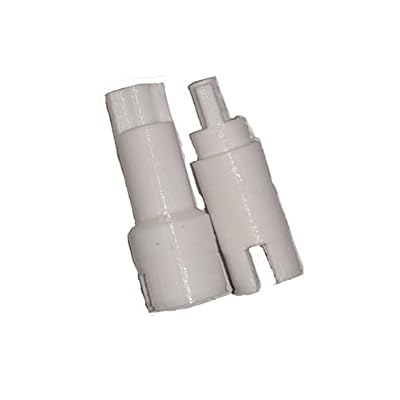
Page Separation Roller shafts for Epson Workforce DS-510560 scanners
Replacement roller shafts for Epson DS-510 and DS-560 scanners to prevent paper jams and clicking noise
Page Separation Roller shafts for Epson Workforce DS-510560 scanners
Numéro d'article: 25178068

Page Separation Roller shafts for Epson Workforce DS-510560 scanners

Numéro d'article: 25178068

DJF 4015

Price Details

Excluding Shipping & Custom charges ( Shipping and custom charges will be calculated on checkout )

*All items will import from États-Unis

En rupture de stock
États-Unis Importé depuis la boutique USA
nos meilleurs partenaires logistiques
  • fedex
  • dhl
Replacement roller shafts for Epson DS-510 and DS-560 scanners to prevent paper jams and clicking noise
Garantie U-Care :
Aucun
Sélectionnez un forfait
fast shipping

Livraison
rapide

free return

Retour
gratuit*

Emballage sécurisé

Emballage sécurisé

Produits 100 % originaux

Produits 100 % originaux

pci-dss

Conformité PCI DSS

iso certified

Certifié ISO 27001


paypal payment
visa payment
mastercard payment
Note: Step Down Voltage Transformer required for using electronics products of États-Unis store (110-120). Recommended power converters Acheter maintenant.

Ce qui se démarque

Precision Engineering
These roller shafts are designed with precision to ensure smooth paper feeding, minimizing jams and improving overall scanning efficiency for the Epson Workforce DS-510/560 models.
Durable Material
Constructed from high-quality, durable materials, these roller shafts provide long-lasting performance, ensuring your scanner operates optimally without frequent replacements or maintenance expenses.
Easy Installation
Designed for user-friendly installation, these roller shafts allow for quick replacement, reducing downtime and enabling users to get back to scanning tasks promptly and efficiently.

Détails du produit

Shop the best selection of high-quality Page Separation Roller Shafts for Epson Workforce DS-510560 Scanners at Ubuy Djibouti. Get fast shipping and great prices on all your scanner needs.
  • Replacement page separation roller shafts for Epson Workforce DS-510 and DS-560 scanners
  • Designed to fix scanner jams and clicking noise when feeding multiple pages
  • May be compatible with other scanners in the same series
  • Confirm fitment specifically for DS-510 and DS-560 models
  • Essential parts for maintaining the functionality of the scanner
  • Ensure smooth and efficient document scanning with these replacement shafts
Scanner TypeDocument
Resolution600 dpi
Paper SizeLetter, Legal
Optical Sensor TechnologyCIS
Item Weight1 Ounces (28.35 grams)
Minimum System RequirementsWindows 7
BrandGeneric
UPC689354582747
ManufacturerEpsonScannerRepair
Sheet SizeLetter, Legal

À qui est-ce destiné ?

Suitable For
  • Frequent Scanners

    Ideal for users who scan documents regularly and require consistent, reliable performance from their scanning hardware.

  • Office Environments

    Perfect for office settings where document management is essential and efficiency in scanning processes is prioritized.

  • Cost-Conscious Users

    Beneficial for budget-minded individuals or businesses looking to maintain equipment without the cost of replacement scanners.

Not Suitable For
  • Low Volume Users

    Not suitable for users who rarely scan and may not need to invest in replacement parts for their scanners.

  • Non-Epson Models

    Incompatible with scanners other than Epson DS-510/560, limiting utility for users with different brands or models.

  • Casual Home Use

    Not recommended for home users with minimal scanning needs; simpler solutions may suffice for occasional document digitizing.

DESCRIPTION DU PRODUIT

Page Separation Roller shafts for Epson Workforce DS-510560 scanners

Vous avez une question ? Chattez avec nous

Questions et réponses des clients

  • question: What are Page Separation Roller shafts and why are they important for Epson Workforce DS-510560 scanners?

    répondre: Page Separation Roller shafts are crucial components in document scanners like the Epson Workforce DS-510560. They ensure that pages are fed through the scanner one at a time, preventing jams and misfeeds. This is important for maintaining efficient and accurate scanning, especially for large documents or stacks of papers. If this component is worn out or damaged, you may experience frequent paper jams, degraded scanning performance, and an increased risk of damaging your documents.
  • question: What symptoms indicate a need to replace the Page Separation Roller shafts in my scanner?

    répondre: If you notice frequent paper jams, misfeeds, or unclear scans, it may be time to replace the Page Separation Roller shafts. Other signs include unusual noises during operation or inconsistent feeding of documents. These symptoms not only lead to frustrating scanning experiences but can also impact the quality of your digitized documents. Addressing these issues promptly through replacement of the roller shafts can enhance the overall scanning performance of your Epson Workforce DS-510560.
  • question: Can I install the Page Separation Roller shafts myself, or should I seek professional help?

    répondre: You can typically install Page Separation Roller shafts yourself if you have basic technical skills and follow the manufacturer’s guidelines. Many users find step-by-step tutorial videos helpful in navigating the replacement process. However, if you're uncomfortable with DIY repairs or lack the right tools, consulting a professional technician ensures a successful and safe installation, preventing possible damage to your scanner.
  • question: How does the quality of replacement Page Separation Roller shafts impact my scanning experience?

    répondre: Using high-quality replacement Page Separation Roller shafts can significantly enhance your scanning experience. They help maintain the consistent feed of paper, ensuring fewer jams and clear scans. Quality parts are designed to fit perfectly, delivering reliable performance over time. On the other hand, low-quality parts might lead to additional jams and inconsistent performance, negating the advantages of your scanner. It’s advisable to invest in reputable replacements to ensure durability.
  • question: Where can I buy Page Separation Roller shafts for my Epson Workforce DS-510560 scanner?

    répondre: You can buy Page Separation Roller shafts for your Epson Workforce DS-510560 scanner through Ubuy. Ubuy offers a wide selection of replacement parts for various scanner models, ensuring you find the correct components. They make purchasing straightforward by providing detailed product descriptions and customer reviews, helping you make informed decisions.
  • question: How often should I replace the Page Separation Roller shafts in my scanner?

    répondre: Replacement frequency for Page Separation Roller shafts depends on your scanning volume and usage patterns. If you frequently scan large batches of documents, you may need to replace the roller shafts more often. Regular inspections for wear and tear can guide you; if you notice performance declines such as jams or feeding issues, it may be time for a replacement. Timely replacement can help maintain the efficiency and longevity of your scanner.
  • question: Are there different types of Page Separation Roller shafts for the Epson Workforce DS-510560?

    répondre: While there are various brands producing Page Separation Roller shafts compatible with the Epson Workforce DS-510560, compatibility should be a priority to ensure proper function. It’s crucial to check specifications or consult customer service when selecting replacement rollers to avoid purchasing the wrong type, which could lead to further issues down the road. Choose parts that meet the manufacturer’s standards for optimal performance.
  • question: What maintenance tips can help prolong the life of my scanner’s Page Separation Roller shafts?

    répondre: To prolong the life of your scanner’s Page Separation Roller shafts, regular cleaning and maintenance are key. Dust and debris can accumulate on these parts, affecting performance. Use a soft cloth or appropriate cleaning product to keep the rollers clean. Additionally, avoid excessive force when inserting documents and ensure paper is loaded properly. These practices can help maintain optimum scanning performance and reduce the frequency of replacements.
  • question: What impact do damaged Page Separation Roller shafts have on the overall functionality of the scanner?

    répondre: Damaged Page Separation Roller shafts can significantly disrupt the functionality of your scanner. They often lead to increased paper jams, inconsistent feeding, and even potential damage to documents being scanned. This not only frustrates users but can also slow down productivity in environments relying heavily on efficient document management. Thus, to ensure smooth operation and avoid costly setbacks, it's important to address any damage to these components promptly.
  • question: How do I know if I’ve chosen the correct replacement Page Separation Roller shafts for my scanner?

    répondre: To ensure you've chosen the correct replacement Page Separation Roller shafts for your Epson Workforce DS-510560, verify compatibility by checking product descriptions and specifications provided by the seller. Look for compatibility lists or user reviews to affirm that the parts fit your scanner model. Additionally, comparing the new part against the original can help ascertain that you have selected the right replacement, ensuring seamless functionality.

Accessories Editorial Review

The Page Separation Roller shafts for Epson Workforce DS-510560 scanners have received overwhelmingly positive reviews from customers. Many customers praised the product for fixing their Epson scanner's feeding issues and restoring it to full functionality. The installation process was mentioned as not being too difficult, although some found the online instructions to be mediocre. One customer mentioned that these roller shafts were able to salvage their scanner for a minimal cost, saving them from having to buy a new one. Another customer even mentioned that a technician had stated their scanner couldn't be repaired, but they were able to identify the faulty part and fix it with these roller shafts. While some customers found the installation instructions to be a bit challenging to follow, they emphasized that the instructions were clear and it was worth being patient. A few customers appreciated the related installation photos and instructions provided. Overall, the Page Separation Roller shafts for Epson Workforce DS-510560 scanners have been positively received by customers for their ability to fix feeding issues and restore scanners to full operation.

Avis et évaluations clients

5.0
1 évaluations des clients
  • 5 étoile
    100%
  • 4 étoile
    0%
  • 3 étoile
    0%
  • 2 étoile
    0%
  • 1 étoile
    0%

Donnez votre avis sur ce produit

Partagez votre avis avec d'autres clients

Avantages

  • Fixes Epson scanner feeding problems
  • Able to salvage scanners for a minimal cost
  • Installation process not too difficult
  • Clear instructions provided (although some found them mediocre)
  • Works better than new for many customers

Les inconvénients

  • Online installation instructions could be improved

Historique des prix du produit

Informations importantes

  • Limitations : Pour les produits expédiés à l'international, veuillez noter que toute garantie du fabricant peut ne pas être valide ; les options de service du fabricant peuvent ne pas être disponibles ; les manuels, instructions et avertissements de sécurité des produits peuvent ne pas être dans les langues du pays de destination ; les produits (et les matériaux qui les accompagnent) peuvent ne pas être conçus conformément aux normes, spécifications et exigences d'étiquetage du pays de destination ; et les produits peuvent ne pas être conformes à la tension et aux autres normes électriques du pays de destination (nécessitant l'utilisation d'un adaptateur ou d'un convertisseur le cas échéant). Il incombe au destinataire de s'assurer que le produit peut être importé légalement dans le pays de destination. En cas de commande auprès d'Ubuy ou de ses filiales, le destinataire est l'importateur officiel et doit se conformer à toutes les lois et réglementations du pays de destination.
  • Tous les produits listés sur Ubuy ne sont pas à vendre, Ubuy étant un moteur de recherche mondial. Les produits sont soumis aux réglementations en matière d'exportation et de commerce.